 11
11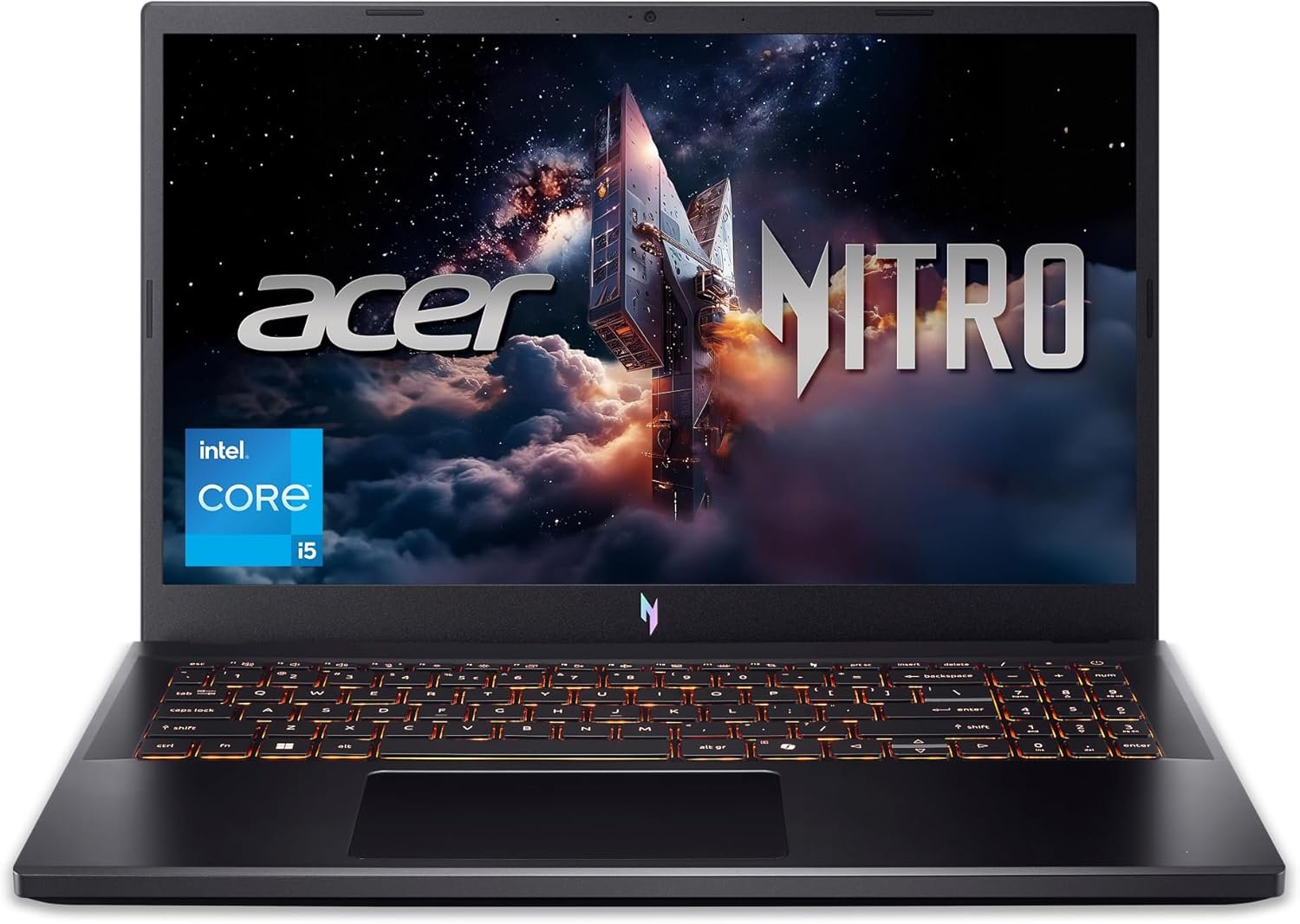
The landscape of personal computing has undergone a profound transformation over the last decade, particularly in the realm of performance-oriented machines. What was once the exclusive domain of bulky desktops and specialized workstations has now largely migrated into the more portable and versatile form factor of laptops. This evolution is perhaps most evident in the gaming sector, where the demand for high-fidelity graphics, smooth frame rates, and immersive experiences has driven relentless innovation. Modern gaming laptops are no longer just about raw power; they represent a delicate balance of cutting-edge processors, advanced graphics cards, efficient cooling systems, and vibrant displays, all encased in a chassis designed for both aesthetics and functionality. For many, a gaming laptop serves not only as a portal to virtual worlds but also as a powerful tool for demanding academic tasks, creative projects, and general productivity.
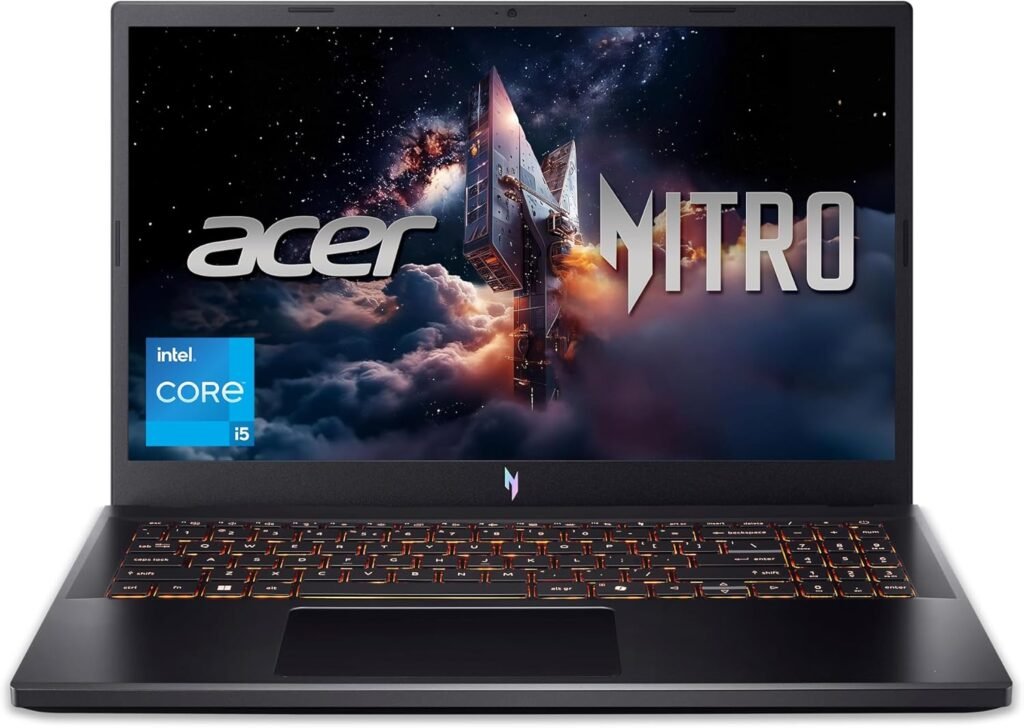
In this dynamic environment, the Acer Nitro V Gaming Laptop emerges as a notable contender, positioned to cater to a broad audience ranging from aspiring esports enthusiasts to students needing a robust machine that can handle both their studies and their leisure. This particular model, equipped with an Intel Core i5-13420H processor and an NVIDIA GeForce RTX 4050 Laptop GPU, seeks to strike a compelling balance between accessible pricing and capable performance. It represents Acer’s continued commitment to delivering gaming solutions that don’t necessarily break the bank, making the immersive world of PC gaming more approachable. Understanding its place in the market requires a detailed look into its core components, its practical utility in various scenarios, and the overall value proposition it offers to the discerning consumer.
This comprehensive guide delves into the Acer Nitro V Gaming Laptop (ANV15-52-586Z), dissecting its technical architecture, exploring its real-world applications, and offering insights into its long-term durability and maintenance. Our aim is to provide a thorough, educational overview that empowers potential buyers with the knowledge needed to make an informed decision, ensuring they understand both the strengths and the practical considerations associated with this specific hardware configuration. We will explore how its components work in synergy to deliver a gaming experience, its suitability for different user profiles, and critical factors to weigh before integrating it into your digital life.
The Acer Nitro V Gaming Laptop (ANV15-52-586Z) combines an Intel Core i5-13420H processor and NVIDIA RTX 4050 graphics with a 165Hz FHD display, offering solid 1080p gaming performance and versatile computing capabilities in an upgradable and budget-conscious package.
Sponsored affiliate link • Real-time details and availability on Amazon
The Acer Nitro V Gaming Laptop (ANV15-52-586Z) is engineered as a performance-driven machine designed to meet the demands of modern gaming and intensive computing tasks. Its technical architecture is built around a powerful combination of Intel’s 13th generation processing capabilities and NVIDIA’s Ada Lovelace graphics, complemented by a high-speed display and efficient storage solutions. Understanding these core components is crucial to appreciating the laptop’s overall performance profile and its suitability for various applications.
At the heart of the Nitro V lies the Intel Core i5-13420H processor. This CPU is part of Intel’s Raptor Lake lineup, fabricated on a 10nm process. It features a hybrid architecture, comprising four performance cores (P-cores) with Hyper-Threading and four efficiency cores (E-cores) without Hyper-Threading, totaling 8 cores and 12 threads. The P-cores can reach clock speeds up to 4.6 GHz, while the E-cores operate at up to 3.4 GHz. This configuration is designed to offer a balance of high single-threaded performance for gaming and multi-threaded efficiency for demanding applications and multitasking. The i5-13420H handles a thermal design power (TDP) of 45W (PL1) with a short burst power (PL2) of 115W, indicating its capability to sustain performance under load. While it might not match the raw power of higher-tier i7 or i9 processors or some of AMD’s top mobile offerings, its performance is more than sufficient for general computing, most gaming scenarios, and many productivity tasks, providing a solid foundation for the laptop’s capabilities. [newegg.com]
The processor’s hybrid design intelligently allocates tasks to the most appropriate cores, optimizing power consumption and performance. This means that background tasks can run on the E-cores, leaving the more powerful P-cores free to handle foreground applications like games or video editing software. This dynamic allocation contributes to a smoother user experience, reducing stuttering and improving responsiveness. For a gaming laptop in this segment, the i5-13420H offers a compelling blend of cost-effectiveness and raw computational power, ensuring that it doesn’t become a significant bottleneck for the dedicated graphics card in most gaming titles. Its integration also supports modern features like DDR5 memory, contributing to the system’s overall speed and efficiency.
The graphical horsepower of the Acer Nitro V is provided by the NVIDIA GeForce RTX 4050 Laptop GPU. This is a mid-range graphics solution from NVIDIA’s Ada Lovelace generation, featuring 2,560 shading units and 6GB of GDDR6 VRAM with a 96-bit interface. Acer has configured this particular RTX 4050 with a Total Graphics Power (TGP) of 75 watts (60 watts base plus 15 watts Dynamic Boost). While this TGP is on the lower end for an RTX 4050, it still enables strong performance for 1080p gaming. The RTX 4050 supports modern graphics technologies such as real-time ray tracing and DLSS (Deep Learning Super Sampling), which can significantly enhance visual fidelity and frame rates in compatible games. [newegg.com]
The RTX 4050’s performance allows the Nitro V to handle a wide array of games, from popular esports titles like Valorant and CS:GO, where it can easily push hundreds of frames per second, to more graphically demanding AAA games. For the latter, users can expect playable frame rates at 1080p resolution, often with a mix of medium to high settings. The inclusion of DLSS is particularly beneficial, as it uses AI to render games at a lower resolution and then upscales them, providing a noticeable boost in performance without a significant drop in image quality. This feature extends the longevity and capability of the GPU, allowing it to tackle future titles more effectively. While a higher TGP would yield better performance, the 75W configuration still delivers a solid gaming experience for its price point, making it a capable engine for immersive gameplay. [notebookcheck.net]
The visual gateway to the gaming experience is a 15.6-inch Full HD (1920 x 1080) IPS display with a high refresh rate of 165Hz. (Note: some variants, like the ANV15-51-51H9, feature a 144Hz display, but the ANV15-52-586Z specifically mentions 165Hz). The IPS (In-Plane Switching) panel technology ensures wide viewing angles and generally good color reproduction, which is important for both gaming and multimedia consumption. The Full HD resolution is the sweet spot for the RTX 4050, allowing it to render games at native resolution without excessive strain, thereby maximizing frame rates. [newegg.com]
The standout feature of this display is its high refresh rate. A 165Hz refresh rate means the screen can update 165 times per second, resulting in significantly smoother motion and reduced input lag compared to standard 60Hz displays. This is a critical advantage in fast-paced games where every millisecond counts, providing a more fluid and responsive visual experience. While the display’s brightness (around 260-290 cd/m²) and color coverage (approximately 60% sRGB) are not class-leading, they are functional for gaming and general use. For a budget-friendly gaming laptop, the high refresh rate IPS panel is a key selling point, enhancing the overall gaming immersion and competitive edge. [notebookcheck.net]
The Acer Nitro V comes with 8GB of DDR5 RAM. DDR5 memory offers higher bandwidth and improved efficiency compared to its DDR4 predecessor, contributing to faster data access and overall system responsiveness. The laptop is equipped with two DDR5 slots, supporting a maximum capacity of up to 32GB. This is a crucial detail, as while 8GB is a functional starting point, upgrading to 16GB is often recommended for more demanding games and intensive multitasking to unlock the full potential of the CPU and GPU. [newegg.com]
For storage, the Nitro V includes a 512GB PCIe Gen 4 SSD. This type of solid-state drive provides significantly faster read and write speeds compared to older SATA SSDs or traditional hard disk drives, resulting in quicker boot times, faster game loading, and snappier application performance. The Gen 4 interface further boosts these speeds. Importantly, the laptop also features an additional M.2 slot, allowing users to easily expand their storage by adding a second SSD. This upgradeability is a major advantage, addressing the common concern that 512GB can quickly fill up with large game installations and other software. [newegg.com]
Connectivity options are comprehensive, featuring Wi-Fi 6 (802.11ax) for high-speed wireless internet, Bluetooth 5.1, and a Gigabit Ethernet port for stable wired connections. Port selection includes a Thunderbolt 4 port, which offers versatile high-speed data transfer, video output, and power delivery capabilities. Additionally, there are multiple USB 3.2 ports (specifically three USB-A 3.0 ports and one USB 3.2 Gen 2×2 20Gbps port), an HDMI 2.1 output for connecting to external displays, and an audio jack. The keyboard is full-sized, featuring a numeric keypad and backlighting, enhancing usability in various lighting conditions. [newegg.com]
The design of the Acer Nitro V is functional and aesthetically pleasing, characterized by a black chassis with subtle grey-blue accents on the lid, offering a fresh take on gaming laptop aesthetics. Weighing approximately 4.66 lbs (2.11 kg) and measuring between 0.62″ and 0.93″ in thickness, it strikes a balance between portability and a robust build. The chassis is primarily constructed from plastic, which is typical for laptops in this price range. While it may not offer the premium feel of metal-clad devices, the fit and finish are generally good, and its relatively svelte silhouette contributes to its modern appearance. The laptop also features Acer’s PurifiedView and PurifiedVoice technologies, leveraging AI for enhanced video calls and noise reduction, adding value beyond pure gaming. [newegg.com] [notebookcheck.net]
The Acer Nitro V Gaming Laptop, with its carefully selected components, is designed to be a versatile powerhouse. Its capabilities extend far beyond just gaming, making it a valuable tool for a variety of users and practical scenarios. Understanding these diverse applications can help prospective owners maximize their investment and integrate the laptop seamlessly into their daily workflows.
The primary use case for the Acer Nitro V is, undeniably, gaming. The combination of the Intel Core i5-13420H and the NVIDIA GeForce RTX 4050 GPU, paired with the 165Hz FHD display, creates a compelling platform for immersive 1080p gaming. Users can expect to enjoy a wide range of modern titles with fluid frame rates. For competitive esports titles such as ‘Counter-Strike 2’, ‘Valorant’, ‘League of Legends’, or ‘Dota 2’, the laptop will comfortably push very high frame rates, taking full advantage of the high refresh rate display to provide a smooth, responsive, and competitive edge. The clarity of the IPS panel ensures good visual fidelity, allowing players to discern details quickly in fast-paced environments.
When it comes to graphically demanding AAA games like ‘Cyberpunk 2077’, ‘Elden Ring’, or ‘Starfield’, the RTX 4050 proves its worth. While ‘Ultra’ settings might be too ambitious for consistent 60+ FPS, the laptop will perform admirably at ‘High’ or ‘Medium’ settings, often leveraging NVIDIA’s DLSS technology to boost performance without significant visual compromises. Ray tracing, though more demanding, is also supported, allowing players to experience enhanced lighting and reflections in compatible titles, albeit with a more noticeable performance impact. The efficient cooling system helps maintain these performance levels over extended gaming sessions, preventing thermal throttling and ensuring a consistent experience. This makes the Nitro V a solid choice for gamers who want to experience the latest titles without investing in a top-tier, more expensive machine. [notebookcheck.net]
Beyond gaming, the Acer Nitro V is a highly capable machine for general productivity and academic tasks. The Intel Core i5-13420H processor, with its 8 cores and 12 threads, provides ample processing power for demanding applications. Students can run multiple applications simultaneously, such as word processors, spreadsheets, presentation software, and web browsers with numerous tabs open, without experiencing slowdowns. The fast 512GB PCIe Gen 4 SSD ensures quick boot-ups and rapid loading of applications and files, enhancing overall efficiency. The full-sized backlit keyboard with a numeric keypad is also a significant advantage for typing long essays, coding, or data entry, offering a comfortable and efficient typing experience, even in low-light conditions.
For professionals who require more than basic computing, the Nitro V can handle tasks like light video editing, graphic design, and even some CAD work. While not a dedicated workstation, the RTX 4050 provides hardware acceleration for many creative applications, speeding up rendering times and complex computations. The 8GB DDR5 RAM, though a potential upgrade target, is sufficient for many of these tasks, particularly if other applications are closed. The various USB ports and HDMI output allow for easy connection of external monitors, peripherals, and storage devices, transforming the laptop into a versatile desktop-like setup for focused work or presentations. Its robust performance makes it a reliable companion for intense study sessions or professional assignments.
The Nitro V’s 15.6-inch Full HD IPS display, coupled with its capable audio system, makes it an excellent device for multimedia consumption. Streaming high-definition movies, watching YouTube videos, or enjoying music is a pleasant experience with clear visuals and decent sound quality. The IPS panel’s wide viewing angles ensure that colors remain consistent even when viewed from the side, making it suitable for sharing content with others. The laptop’s processing power ensures smooth playback of even 4K video content, provided the display itself is limited to FHD. Acer’s PurifiedVoice noise reduction technology can also enhance online communication, making video calls clearer.
For budding content creators, the Acer Nitro V offers a solid entry point. The RTX 4050’s dedicated video encoders (NVENC) accelerate video rendering and streaming tasks, which is a major benefit for those interested in platforms like Twitch or YouTube. Basic photo editing in applications like Adobe Photoshop or GIMP, and even some video editing in software like Adobe Premiere Pro or DaVinci Resolve, can be performed effectively. While the display’s color accuracy might not satisfy professional photographers or videographers, it is perfectly adequate for hobbyists and learning purposes. The upgradeable RAM and storage also mean that as a creator’s needs grow, the laptop can evolve with them, accommodating larger project files and more complex software demands.
Given its relatively moderate weight of 4.66 lbs (2.11 kg) for a gaming laptop, the Acer Nitro V can serve as a portable entertainment hub. Whether traveling, visiting friends, or simply moving from room to room, it’s manageable to carry around. This portability allows users to take their entire game library, movie collection, and creative projects with them wherever they go. The decent battery life (up to 9.5 hours for light use) further enhances its utility as a mobile device, though for gaming, it’s always advisable to stay connected to power. The backlit keyboard makes it usable in dimly lit environments, perfect for late-night gaming sessions or movie watching. Its robust build, while plastic, is designed to withstand the rigors of regular movement, making it a reliable companion for those who need performance on the go.
Sponsored affiliate link • Real-time details and availability on Amazon
The Acer Nitro V Gaming Laptop is designed to appeal to a specific segment of the computing market, balancing performance, features, and cost. Understanding the target audience for this device is crucial for potential buyers to determine if it aligns with their needs and expectations. This laptop fills a vital niche for individuals seeking capable hardware without the premium price tag often associated with high-end gaming machines.
This laptop is particularly well-suited for Entry-to-Mid-Level Gamers who are looking for their first dedicated gaming machine or an upgrade from an older, less capable system. It provides a solid foundation for playing modern titles at 1080p resolution with respectable frame rates, especially when paired with its high refresh rate display. It’s also ideal for Students who need a powerful laptop that can handle both their academic workload and provide a strong gaming experience during leisure time. The combination of a robust CPU, dedicated GPU, and a comfortable keyboard makes it versatile for essays, coding, presentations, and entertainment. Furthermore, it’s a good fit for Budget-Conscious Users who prioritize performance per dollar and are comfortable with the idea of potentially upgrading components like RAM and storage down the line to maximize their investment. Its upgradeability is a significant draw for those who want to extend the laptop’s useful life.
However, the Acer Nitro V might not be the ideal choice for everyone. Professional Content Creators, particularly those involved in color-critical work like photography or video editing, may find the display’s color accuracy and brightness to be a limiting factor. These users would likely benefit more from laptops featuring higher-gamut displays (e.g., 100% sRGB or DCI-P3 coverage) and potentially more RAM out of the box. Similarly, Hardcore Enthusiast Gamers who demand the absolute highest frame rates at maximum settings in all titles, or those who wish to game at resolutions higher than 1080p, might find the RTX 4050 (especially at 75W TGP) to be less powerful than desired. These users might consider stepping up to laptops with RTX 4060, RTX 4070, or higher GPUs with higher TGP limits for uncompromising performance. Finally, Users Seeking Premium Build Materials or a very slim and lightweight design might also look elsewhere, as the Nitro V’s plastic chassis and moderate weight are typical for its budget-friendly segment.
Acquiring a new laptop, especially a gaming one, involves a significant investment. Beyond the raw specifications, several practical considerations can influence the long-term satisfaction and utility of the device. For the Acer Nitro V Gaming Laptop, these considerations span from its operational nuances to its ergonomic design and environmental impact, all of which contribute to its overall value proposition.
One of the most immediate considerations for the Acer Nitro V is its default configuration of 8GB DDR5 RAM and a 512GB PCIe Gen 4 SSD. While 8GB of DDR5 is a functional starting point, modern gaming and multitasking can quickly push this limit. Many current AAA games recommend 16GB of RAM for optimal performance, and running multiple applications simultaneously (e.g., a game, a web browser, and a communication app) can lead to performance bottlenecks with only 8GB. Therefore, prospective buyers should factor in the potential need for a RAM upgrade. Fortunately, the Nitro V’s design allows for straightforward RAM expansion, with two DDR5 slots supporting up to 32GB. This means that an additional 8GB or 16GB stick can be easily installed, significantly enhancing the laptop’s long-term performance and multitasking capabilities. This is a crucial aspect for ensuring the laptop remains responsive and capable for several years.
Similarly, the 512GB SSD, while fast, can become a limitation for gamers. Modern game installations often consume 50GB, 100GB, or even more, meaning a 512GB drive can quickly fill up with just a handful of titles, leaving little space for the operating system, other applications, and personal files. The presence of a second, empty M.2 slot is a significant advantage, allowing users to add another SSD without removing the primary one. This upgrade path provides ample room for expanding your game library and storing larger files, making the laptop much more versatile. Considering these potential upgrades at the time of purchase, both in terms of cost and effort, is important for maximizing the laptop’s utility and ensuring it meets your needs well into the future.
The 15.6-inch Full HD IPS display with a 165Hz refresh rate is a strong point for gaming, offering smooth visuals crucial for fast-paced titles. However, its other characteristics, such as brightness (around 260-290 nits) and color coverage (approximately 60% sRGB), are moderate. For typical gaming and general use, these specifications are perfectly adequate. The IPS technology ensures good viewing angles, which is beneficial for sharing content or playing with friends. The contrast ratio is also decent for an IPS panel. Yet, for users involved in professional creative work, such as graphic design, video editing, or photography, where color accuracy is paramount, this display might not meet their stringent requirements. Such professionals often need displays with higher brightness, wider color gamuts (e.g., 100% sRGB, AdobeRGB, or DCI-P3), and factory calibration to ensure accurate color representation. [notebookcheck.net]
Therefore, potential buyers should align the display’s capabilities with their primary usage. If the laptop is primarily for gaming, general productivity, and casual media consumption, the display is excellent for its price point. However, if precise color work is a significant part of your workflow, you might need to consider an external, color-calibrated monitor for those specific tasks, or explore other laptop models with more premium display options. Understanding this trade-off is key to avoiding disappointment and ensuring the display meets your specific visual demands.
Effective thermal management is critical for gaming laptops to maintain consistent performance and prevent component degradation over time. The Acer Nitro V employs a dual-fan cooling system with an efficient exhaust design to dissipate heat generated by the Intel Core i5 and NVIDIA RTX 4050. During intense gaming sessions, the fans will inevitably ramp up to keep temperatures in check, which can lead to noticeable fan noise. While this is a common characteristic of gaming laptops, some users are more sensitive to noise than others. Acer’s NitroSense software allows users to monitor temperatures and adjust fan profiles (e.g., Balanced, Performance modes), offering some control over the thermal and acoustic balance. However, in Performance mode, the laptop can become considerably louder. [newegg.com] [notebookcheck.net]
Prospective buyers should consider their typical usage environment. If gaming will frequently occur in quiet spaces, the fan noise might be a factor. Using a good quality gaming headset can mitigate this during gameplay. It’s also important to ensure proper airflow around the laptop by avoiding placing it on soft surfaces that can block vents. Regular cleaning of the fan vents to prevent dust buildup will also contribute to optimal cooling performance and longevity. While the cooling system is effective for its class, managing expectations regarding noise levels during peak performance is a practical consideration.
The Acer Nitro V’s chassis is primarily constructed from plastic, a common material choice for gaming laptops in the budget to mid-range segment. While it offers a clean fit and finish and a modern aesthetic with subtle accents, it may not possess the same rigidity or premium feel as laptops with metal chassis. Users should be mindful that plastic can be more susceptible to flex or minor creaking under pressure. However, for its price point, the build quality is generally considered acceptable, offering a balance between cost and durability. The laptop’s weight at 4.66 lbs (2.11 kg) and its relatively svelte profile make it one of the lighter options in its class, enhancing its portability. This means it’s manageable to carry in a backpack for commuting to classes, work, or gaming events without feeling overly burdensome. [notebookcheck.net]
The hinges, while providing a decent maximum opening angle of approximately 140°, might exhibit some slight wobbliness, which is not uncommon in this price category. While this doesn’t necessarily indicate a lack of durability, it’s an ergonomic nuance to be aware of. Overall, the design prioritizes functionality and cost-effectiveness. Users who frequently travel with their laptop or require a robust daily driver will appreciate its manageable weight, but those who prefer the tactile feel and perceived durability of premium materials might need to adjust their expectations or explore higher-priced alternatives. Proper care and handling will ensure the longevity of the plastic chassis.
Sponsored affiliate link • Real-time details and availability on Amazon
To fully appreciate the Acer Nitro V Gaming Laptop, it’s helpful to contextualize its position within the broader landscape of computing devices. Laptops today cater to a vast spectrum of needs, from ultra-portable productivity machines to desktop replacements designed for extreme performance. The Nitro V occupies a specific segment, offering a balance that distinguishes it from both entry-level options and high-end specialized systems.
Compared to Entry-Level Laptops or Ultrabooks, the Acer Nitro V stands in a league of its own regarding performance. Standard ultrabooks, often equipped with integrated graphics and lower-tier processors (e.g., Intel Core i3 or i5 U-series), are designed for portability, battery life, and basic productivity tasks like web browsing, document editing, and streaming. They typically lack the dedicated graphics card, high refresh rate display, and robust cooling system necessary for gaming or demanding applications. The Nitro V, with its Intel Core i5-13420H and NVIDIA RTX 4050, offers vastly superior computational and graphical power, enabling smooth gaming, video editing, and complex simulations that would be impossible on a basic laptop. While ultrabooks excel in portability and quiet operation, they cannot match the sheer processing muscle or graphical fidelity of a gaming-oriented machine like the Nitro V. The difference in price is often justified by this significant leap in capability.
Conversely, when stacked against Premium Gaming Laptops or High-End Workstations, the Acer Nitro V positions itself as a more accessible alternative. Premium gaming laptops often feature top-tier processors (e.g., Intel Core i7/i9 HX-series, AMD Ryzen 9) and more powerful GPUs (e.g., RTX 4070, 4080, 4090) with higher TGP limits, alongside QHD or 4K displays, superior cooling, and more refined build materials like aluminum. These machines deliver uncompromising performance, allowing for gaming at higher resolutions and settings, or significantly faster rendering times for professional creative tasks. However, they come with a substantially higher price tag, often ranging from two to five times the cost of the Nitro V. The Nitro V provides a ‘good enough’ experience for many users, delivering 1080p gaming and solid productivity without the exorbitant cost. It offers excellent value for its price point, making high-performance computing more attainable for a broader audience, albeit with some trade-offs in ultimate power and premium features.
A: The Acer Nitro V, equipped with an NVIDIA GeForce RTX 4050 (75W TGP), is capable of running most modern games at 1080p resolution with medium to high settings, achieving playable frame rates. For the most graphically demanding titles, some settings adjustments might be necessary to maintain smooth performance. It’s well-suited for popular esports titles and many AAA games, especially when paired with its high refresh rate display.
A: While 8GB DDR5 RAM is adequate for many current games and general productivity tasks, it can be a bottleneck for certain memory-intensive applications or newer AAA games, particularly if you run multiple programs simultaneously. The good news is that the Acer Nitro V features two DDR5 slots, allowing for an easy upgrade to 16GB or even 32GB, which is highly recommended for optimal performance and future-proofing.
A: Yes, the Acer Nitro V offers excellent upgradeability for storage. It comes with a 512GB PCIe Gen 4 SSD, which is a good starting point. Crucially, it includes an additional free M.2 slot, allowing users to easily add a second SSD for expanded storage capacity without needing to replace the primary drive. This is a significant advantage for gamers who often require large amounts of space for game installations.
A: The Acer Nitro V incorporates an innovative dual-fan cooling system combined with an effective exhaust setup designed to manage heat generated by the CPU and GPU during intensive gaming sessions. While not on par with premium cooling solutions, it generally performs well for its class, preventing significant thermal throttling and ensuring sustained performance under load. Users can also utilize the NitroSense app to monitor temperatures and adjust fan behavior.
A: The Acer Nitro V, with its 57 Wh battery, offers respectable battery life for a gaming laptop. In lighter use scenarios, such as web browsing or document editing with reduced brightness, it can achieve around 9.5 hours of usage. However, for gaming or demanding tasks, battery life will be significantly shorter, typically ranging from 1 to 3 hours, as is common with dedicated gaming hardware. It’s best used plugged in for performance-intensive activities.
A: Yes, the Acer Nitro V features a 15.6-inch Full HD (1920 x 1080) IPS display with a high refresh rate of 165Hz (some variants may have 144Hz). This high refresh rate ensures smooth visuals, which is crucial for competitive gaming. While the IPS panel offers good viewing angles, its brightness and color coverage (around 60% sRGB) are considered moderate for a gaming laptop, meaning it’s good for gaming but less ideal for color-critical creative work.
A: The Acer Nitro V provides a comprehensive set of connectivity options. It includes modern Wi-Fi 6 (802.11ax) for fast wireless internet, Bluetooth 5.1, and a Gigabit Ethernet port for stable wired connections. For physical ports, it features a versatile Thunderbolt 4 port, multiple USB 3.2 ports (including a high-speed USB 3.2 Gen 2×2 20Gbps port), an HDMI 2.1 output for external displays, and an audio jack. This selection is robust for a budget-friendly gaming laptop.
A: While the Acer Nitro V possesses a capable CPU and GPU, making it suitable for some entry-level creative tasks like video editing or graphic design, it’s not primarily designed for professional creative workflows. The display’s moderate color accuracy and brightness, coupled with the base 8GB RAM, might be limiting for color-critical work or complex rendering tasks. For serious creative professionals, a laptop with a more color-accurate display and higher base RAM would typically be a better investment, though upgrades can improve its capability.
The Acer Nitro V Gaming Laptop (ANV15-52-586Z) represents a well-considered entry in the competitive budget gaming laptop segment. By thoughtfully combining an Intel Core i5-13420H processor with an NVIDIA GeForce RTX 4050 Laptop GPU and a high-refresh-rate 15.6-inch FHD IPS display, Acer has crafted a machine that delivers a compelling gaming experience at 1080p resolution. It successfully navigates the challenge of offering modern hardware without venturing into the premium price territory, making it an attractive option for a wide array of users, from students seeking a versatile academic and entertainment device to gamers making their first foray into PC gaming. Its strong upgradeability in both RAM and storage further enhances its long-term value, allowing users to scale its capabilities as their needs evolve or as software demands increase.
However, like any product designed for a specific price point, the Nitro V comes with certain trade-offs that informed buyers should acknowledge. The initial 8GB DDR5 RAM, while fast, will likely benefit from an upgrade to 16GB for optimal performance in demanding applications and games. Similarly, the 512GB SSD, though speedy, may necessitate a storage expansion for extensive game libraries. The display, while excellent for gaming due to its high refresh rate, offers moderate brightness and color coverage, which might not satisfy the requirements of professional content creators. The plastic chassis, typical for this segment, provides a functional rather than a luxurious feel. These aspects are not necessarily drawbacks but rather important considerations that shape the overall user experience and should be weighed against individual priorities and budget.
Ultimately, the Acer Nitro V Gaming Laptop stands out as a solid, dependable choice for those seeking a balanced gaming and general-purpose computing solution. Its core components are robust enough to handle current and near-future titles, while its upgrade potential ensures a degree of future-proofing. For conscious consumers and discerning buyers who prioritize performance-per-dollar and appreciate the flexibility of user-serviceable components, the Nitro V offers significant value. It’s a pragmatic investment for anyone looking to enjoy immersive gaming and productive computing without overspending, provided they understand its nuanced capabilities and are prepared for potential future upgrades to unlock its full potential.
Sponsored affiliate link • Real-time details and availability on Amazon
*Product availability, detailed specifications, bundled accessories, and shipping conditions are subject to real-time updates on Amazon.